Roger Kutyna
ML and applied AI engineer. M.Sc. Information Technology (Generative AI), Clark University. Bird photographer.
About
I'm an ML and applied AI engineer with an M.Sc. in Information Technology (Generative AI) from Clark University. I build practical systems that put machine learning to work, and when I'm not doing that you'll usually find me outside with a camera pointed at a bird.
Projects
League of Legends AI VOD Review and Coaching
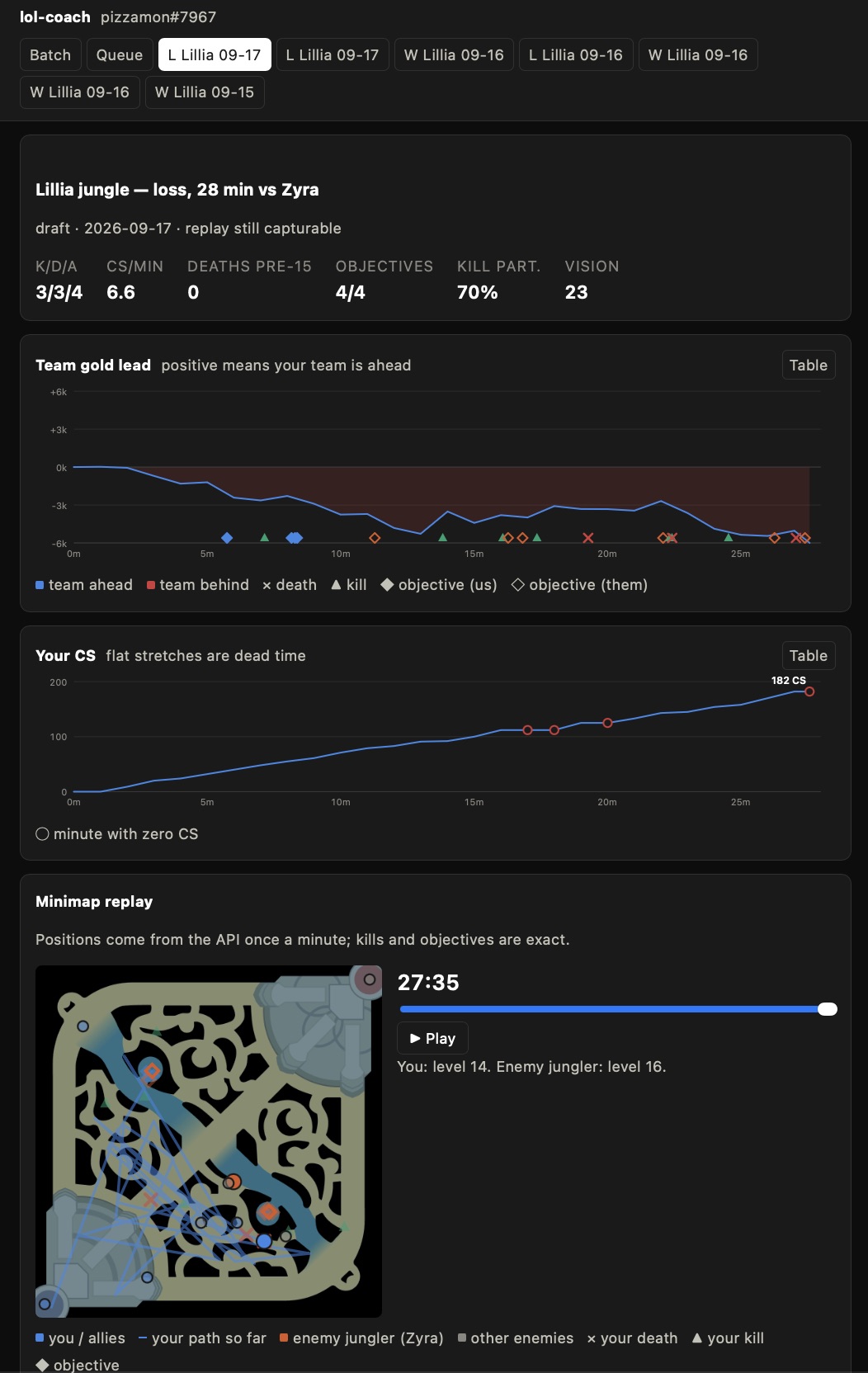
This mini project is a departure from what I’ve been building recently, but fits neatly in line with how I believe that AI is best utilized. Recently, my friends and I have been playing some League of Legends. This game is notoriously difficult, both due to the large number of elements and mechanics to understand and master, but also a passionate playerbase where some measurements put the average play time at 1450 hours (https://noobhours.com/ - average of players who have checked their playtime on this website). Given these factors, it is a difficult game to break into as a new player and a very difficult game to advance in, without some form of external media to reference for improvements. There are a variety of online paid coaching services that fill this void, as well as countless YouTube videos. This use case reads as a perfect place to try using Claude Code to build a personal League of Legends coach. The three things that make this feasible are the API that the game’s developer - Riot Games - publishes to allow a program to pull information and key moments from a game, the ability to download and review previous games in the game’s client with the ability to control it via an API, and the ability of modern agents to process images as input alongside text. This set the structure of this project: a script that pulls the key moments from a game then brings up the replay and captures 1 to 4 frames per second for a duration determined by the event. Claude Code (or another agent) is able to analyze these stats with the visual data of the frames to produce insights about how a moment could have been played better, any mistakes made, and any emerging patterns from the previous games analyzed. The code for this tool is published on my GitHub at https://github.com/rkutyna/lol-coach. I will update this post with any meaningful progress this tool helps me to make, although I don’t intend to play this game enough to catch up to the rest of the playerbase as it is a famously addictive game. While this will not have anywhere near the impact on my life as the previous Fitness Analyst AI project, it is still a good example of what I think is the best way to use AI: Come up with a problem that can be solved, prototype quickly with AI tools, and deploy AI in project to empower people to do what they want to do better and with more insight and less friction. Attached are screenshots of the frontend that I built and the review that it generated for a game from last night.
Fitness Analyst AI: Development and Technical Decisions
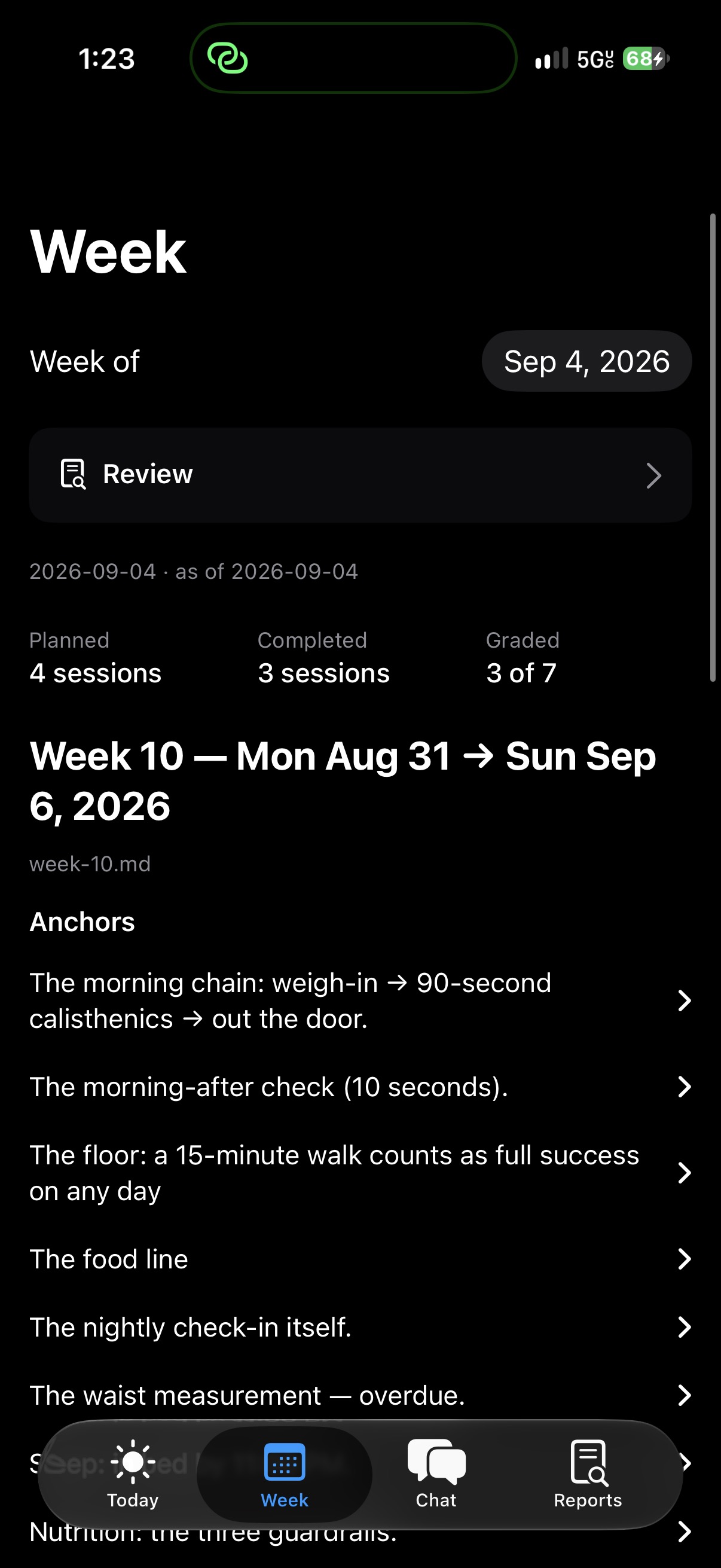
With the open-sourcing of the technical piece of my Fitness Analyst AI project, you will find below a more technical writeup that focuses on the decisions and development structure needed to get this project off the ground. Still waiting to be published: the coaching half of the project with an onboarding process for new users to set up their own goals plans, the iOS app that I have built to export health data to the engine and provide a surface for interacting with the coaching side (shoot me an email if you’d like access to the beta of this app), and a full production version that only requires the app with the rest running in the cloud and the option to use an LLM that is provided and confirmed to work or to bring your own model (local or cloud). ### The Initial Setup: As stated in my first writeup, the governing technical rule of this project - numbers are owned by the code and the LLM acts as the coaching voice over these numbers and other structured output - was created out of necessity. The first model that I was experimenting with for this project was LFM2.5-8B-A1B, an 8 billion parameter model that was optimized for edge use cases. This was running on a gaming PC that I built in 2018 with an Intel i5-7600k, 16gb of memory, and a Radeon R9 390X (8gb of VRAM). This performed admirably in throughput, but could not be relied on to run tool calls and narrate their output, so I decided that the coaching model would simply produce prose rather than relaying numbers. I then progressed through testing several models to see if any others would perform better and ended up settling on Qwen3.5:9b-q4_K_M. This model performed better, but not sufficiently well to relay numbers, so the code rule stuck. The rest of the architecture stack was health data being exported to a server over Tailscale via the health-auto-export app with health data living in a sqlite3 database. My contact to the coach was done over Telegram, where the coach was tied into a Hermes agent that I had been running previously. ### The Development: As you might have already gathered, I didn’t use the local models for developing the app, they were simply there to act as the layer that a user would interact with primarily. The real work of this project - helping with design, coding, data analysis, and fitness plan creation - was done originally with Claude Opus 4.8 in Claude Code with GPT 5.6 Luna subagents (Claude Pro Plan and free Codex credits from a promotion). This was originally done via Claude Code running on my PC that I accessed via ssh into with tasks created whenever I found something that I didn’t like in the project. The first two changes to the structure of the project came in the form of an interactive weekly review/planning session with Claude Opus and daily morning and evening briefings courtesy of Qwen3.5. The overall plan was good, but I felt that I needed more engagement with the project to stick with it and more ability for the plan to change shape in line with my real experience - a theme that we will continue to see throughout this project. The weekly reviews would look at the previous week’s activity - particularly the prescribed runs - and evaluate my performance to understand how plan progression was moving. This was useful, however, it raised a number of issues. The foremost of which resulted in a lack of understanding how the workout was actually going. Running workouts were originally measured primarily with average heart rate and the total time and distance. This creates an issue when I’m doing run-walk intervals where the reviewer would have no idea what the heart rate looked like in the run intervals vs walk intervals. So, a long session would read as running at a low heart rate for a long time. The fix was a jog minutes figure that classifies each bucket of a workout as jogging or walking, so the reviewer sees how long I was actually running rather than how long I was out. That mattered more than it sounds. Workout duration counts walk breaks, and across eight weeks the ratio of duration to jog minutes ranged from 1.09x to 4.86x, which is enough to change the ranking of weeks: three of eight moved two or three places. Week 0 recorded 48 running minutes and contained zero minutes of jogging.The first version of the classifier used pace alone, with a cutoff at 16:00 per mile, and it failed in the opposite direction. As I got fitter I learned a slower easy gear, and a third of my jog buckets fell past the cutoff. The dial read lower the better I got at the thing the plan was asking for, which is close to the worst property a metric can have.The version that stuck classifies on cadence at the start of the bucket, inside a workout window, and leaves pace as a diagnostic on a separate block dial. Adding a heart rate lane looked obviously correct and was the first thing I tried; it moved the figure by 0.7 minutes, so it did not go in. That happened twice in this project: the naive fix was stated in the issue, was physically motivated, and was wrong. This is just one example of issues of this type that were found and I will spare the details on the rest as this represented a large portion of the work over the last three-ish months. Another issue that arose rather frequently was issues with counting total steps and distance, particularly over historical data where the entries are done by day rather than smaller time intervals. This led to issues in which the total steps were double counted through the summation of watch and iPhone entries. One might think that this would be an easy fix (it turned out to be), but simply picking the option with more steps was not it. In getting the step total that is shown in the health app on an iPhone, the phone deduplicates the steps using fine grained time windows, so if I went for a walk in the morning with my phone and watch, it would know to use the watch step count, but then when I take my watch off to charge, it uses the steps from the phone, resulting in a daily total that is reliable. With these time windows lost, there was not a good way to reproduce this daily step total. The easy solution turned out to be that Apple HealthKit exposes a statistics function where the total steps or distance from a given window can be retrieved - mirroring the one shown in the health app. The way that these defects were found and the piece of this project that I most appreciated were regular audits that both audited the technical codebase and coaching flow, but also reevaluated the conclusions that had been originally reached in the early weeks of the plan. One of these dealt with how fast I could ramp up intensity and volume in my workouts. The original plan followed a 10% rule for increasing volume. This was under the assumption that ramping intensity created a higher risk of injury and that I was at a higher risk of injury as someone coming back to exercise after several years: my cardio and muscles would adapt much faster than my connective tissue and bones. This general principle is true, however, an audit on this topic found that scientific evidence does not support the idea that ramping intensity is more risky than volume and that the rate of ramping could be 15%+ without increasing the risk of injury. This was then further changed by another audit which realized that the study being cited was based on two week windows rather than one, so I now use a total jog minutes count for the week which has worked well. I then ran several more of these audits that also asked me questions that could provide more context to findings in the data such as that the assumption that I had previously not stuck with a revival of exercising beyond ~3-4 months - this was mitigated by the fact that I had stopped wearing my watch after one period while still working an active job and gone back to college in the other instance, losing the structure of going to the gym with friends. The final item that drastically changed my experience of this project was simply learning to use agentic development tools more effectively. I was already using Claude Code with subagents, but the tracking of issues was a weak point. The fix for this issue was the use of GitHub Issues that Claude has access to to see what has been done and what needs to be done, so that it can autonomously orchestrate subagents to complete these tasks. This has worked incredibly well with a total of 11 milestones and 269 issues completed with 45 outstanding. The agents create their own issues based on findings, consult me for decisions when necessary, and otherwise implement and close them autonomously. The last piece of this came with the separation of the backend engine from the rest of the project to be published in a new repo without any of my personal data. This involved the creation of a Continuous Integration pipeline that scans commits for personal information or any health data before they are committed to the public repository. ### The Current Structure: The current structure of the project is in four pieces: the backend that handles data ingestion and analysis, the LLM model that narrates over this analysis (including tool calls and curating answers, while code still handles the numbers themselves), the iOS client that handles data export and user interface, and the coaching layer that holds the plan, weekly reviews, and all other aspects of the project that have to do with the fitness plan. This structure was chosen for several reasons: separating the backend from the iOS client allows for background analysis to take place and things like scheduled audits, using an external LLM via the OpenAI API format allows for end users to bring their own model, such as a local model or one from a cloud provider - allowing a choice over how their data is being handled, and the separate coaching layer, which will eventually be published with an onboarding flow that will allow other users to create their own plans and track their progress (still in development).
Fitness Analyst AI
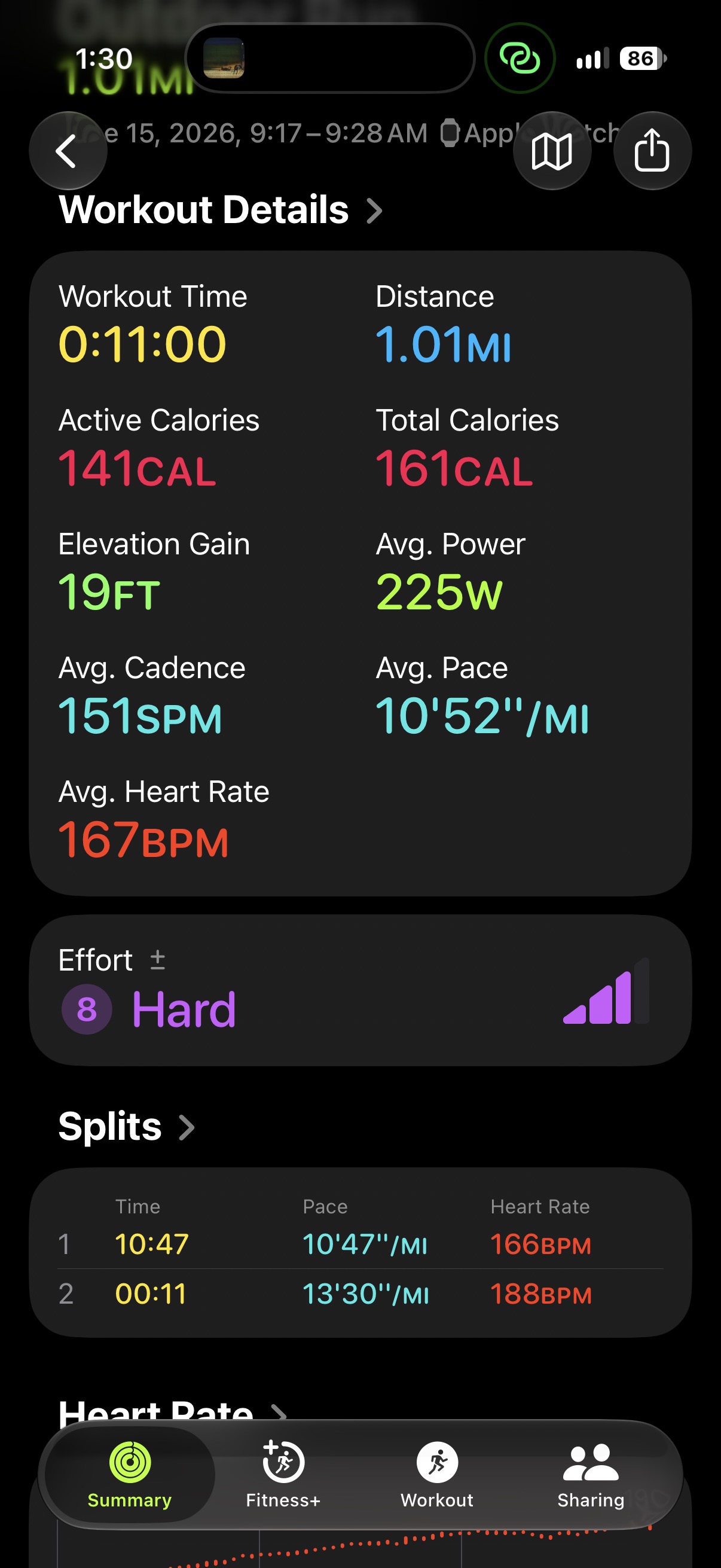
This summer, I set a goal for myself: start getting back in shape. This goal was a bit of a longshot after ~5 years of not exercising since the end of high school. Three things that help to motivate me are having a fun project to work on and see progress, having external structure, and reducing friction towards a goal. With these in mind, I chose to build something that would fulfill these three pieces and push me to get back in shape: Fitness Analyst AI. I had recently purchased an Apple Watch, so I figured something that took in my Apple Health and fitness data and used that to create a long term plan towards a goal I set would do the trick. I knew that planning everything months out would result in a poor fit, so I decided that each week would be planned via an interactive weekly review of the previous week and planning of the next week with the daily workout and reminders sent to me each morning. The one concern that I had going into this project was privacy. Is handing all of my fitness data to AI models that I don’t control a risk worth taking? I decided it wasn’t, at least, not without some controls. My plan was then to run the daily briefings on a local model (Qwen3.5:9b-q4_K_M) that ran on my very old gaming pc and run the weekly analysis through Claude Code with the use of my data for training turned off. I would have liked to run everything entirely offline, but unfortunately, I don’t have the hardware or the budget for a fully offline implementation using a model like Deepseek V4 Flash. The metric of “being in shape” that I chose was the ability to run a few miles without feeling like I was dying at the end. At the start of this, that would be impossible, my benchmark mile was an 11 minute mile and led my heart rate to reach 188 and climbing by the end of the run. I felt like I was dying at the end and am very confident that I couldn’t run another, even at a slower pace. Fortunately, this set a good benchmark: I could run about a mile, but it was an all out effort. With this as the starting block, I used an app to automatically export all of my health and fitness data to an endpoint running on a host. This data was then stored in a sqlite database that was read by Grafana for a visual of my progress. The data was accessible by the local model via a set of custom MCP tools which allowed it to act as the daily “coach” that I interfaced with through the Hermes Agent via Telegram. This helped to restrain the smaller model and make it more effective in its responses as direct access via SQL would have been risky and too much for the model to handle effectively. In addition to this, I was curious to see what the local model could come up with if given an open-ended prompt and access to the MCP tools. This led me to creating the deep dive section where the model would generate and test hypotheses on its own. Given the constraints of running this model, the context was only ~60k tokens, so I knew that both performance-wise and time horizon-wise the model would not be able to handle it. This led me to design the deep dive in four stages: Planner, Researcher, Compiler, Judge. The planner comes up with questions and hypotheses to be tested. The researchers are dispatched per question/hypothesis and use the MCP tools to check these against the data to see if anything significant is discovered. The researchers also have a scratchpad so that if they run out of context, the next researcher can be called and resume where the previous research had left off. The job of the compiler is to assemble the results of the researcher’s scratchpad and output into something coherent that answers and narrates the question such that I could understand the finding and its implications. Lastly, and most importantly, is the judge stage. This stage takes in the numbers computed by the researcher and compares them to recomputed numbers via python and decides if the numbers hold the meaning that the researcher claims they do. This works well and has prevented 49% of research generated numbers that were not reproducible from reaching me. Eventually, I switched to GPT 5.6 Luna for the coach because it is much more capable, and the prompt read time on my old gaming pc was about 30 tokens/second, which is incredibly slow and virtually unusable. However, I intend to switch back to local models once I have the hardware to run something capable. The weekly review also had access to these tools and a Claude Code skill that loaded in the project context and weekly review prompt, however, I found it was most effective when running direct SQL queries and python operations over the data. These reviews kept me engaged and feeling like I had input on the plan while also ensuring that the plan was working and that it continued to match my progress. This turned out to work remarkably well, I gave Claude Code the data for where I was at, my goal, a rough estimate of my time commitment, and told it to come up with an evidence backed plan to get there. The plan that it came up with was based on a lot of zone 2 work - short running and walking intervals to start, with the running intervals slowly increasing from a minute, to a couple minutes, and eventually up to 10 minutes. This was with the constraint that it must be governed by the talk test - could I have a conversation while exercising - which was equivalent to about a 155 bpm heart rate. The most important part of this project turned out to be the audits that I ran on both the technical side and the fitness side. The first audit was simply to verify that the technical pieces worked. Several metrics weren’t working for various reasons, like the VO2 max score was dropping because of a mismatched string. These were able to be fixed rather easily. The more interesting audits were those on the fitness side. During the plan, it felt like the plan and weekly reviews had come to a conclusion and stuck with that conclusion, even as the evidence that had originally supported it changed. For example, the most frustrating one was injury risk. The plan had originally done research on injury risk and concluded that I, as a person who was formerly fit, am at a risk of ramping too fast as my muscles and cardio improve much faster than my connective tissue and bones. This is true, however, the ramp speed that was originally set was quite slow and didn’t include check-ins on things like soreness or stiffness. I got impatient with this and prompted a complete audit on these conclusions. Through research and a review of my reported lack of soreness or stiffness, it was able to conclude that the initial ramp had become too cautious and there was no longer evidence to back it, which allowed us to increase the ramp speed more inline with what the evidence based research suggests. Since then, I have created standing audits on conclusions like this that change with time, making the plan much better at conforming to reality and allowing me to push myself in a healthy way. Since then, and over the course of about 71 workouts, including ~30 runs, I have achieved my goal! I was able to run a 5k continuously at a slow pace but with my heart rate around 155 bpm and felt good at the end. This is certainly not the end. I am currently working on porting this project to something that more resembles a product that others can use in the form of an app with an encrypted cloud backend for the database and analysis to run. I also plan to continue running and have set the goal of running a 5k at a 12 min/mile pace in the next month or two. I will create another post with an update on the production prototype port of this project along with any fitness goals that I am able to achieve via this project! I will post this prototype to GitHub so that others can try it.
BirdBrained: Automatic Bird Species Identification and Photo Tagging
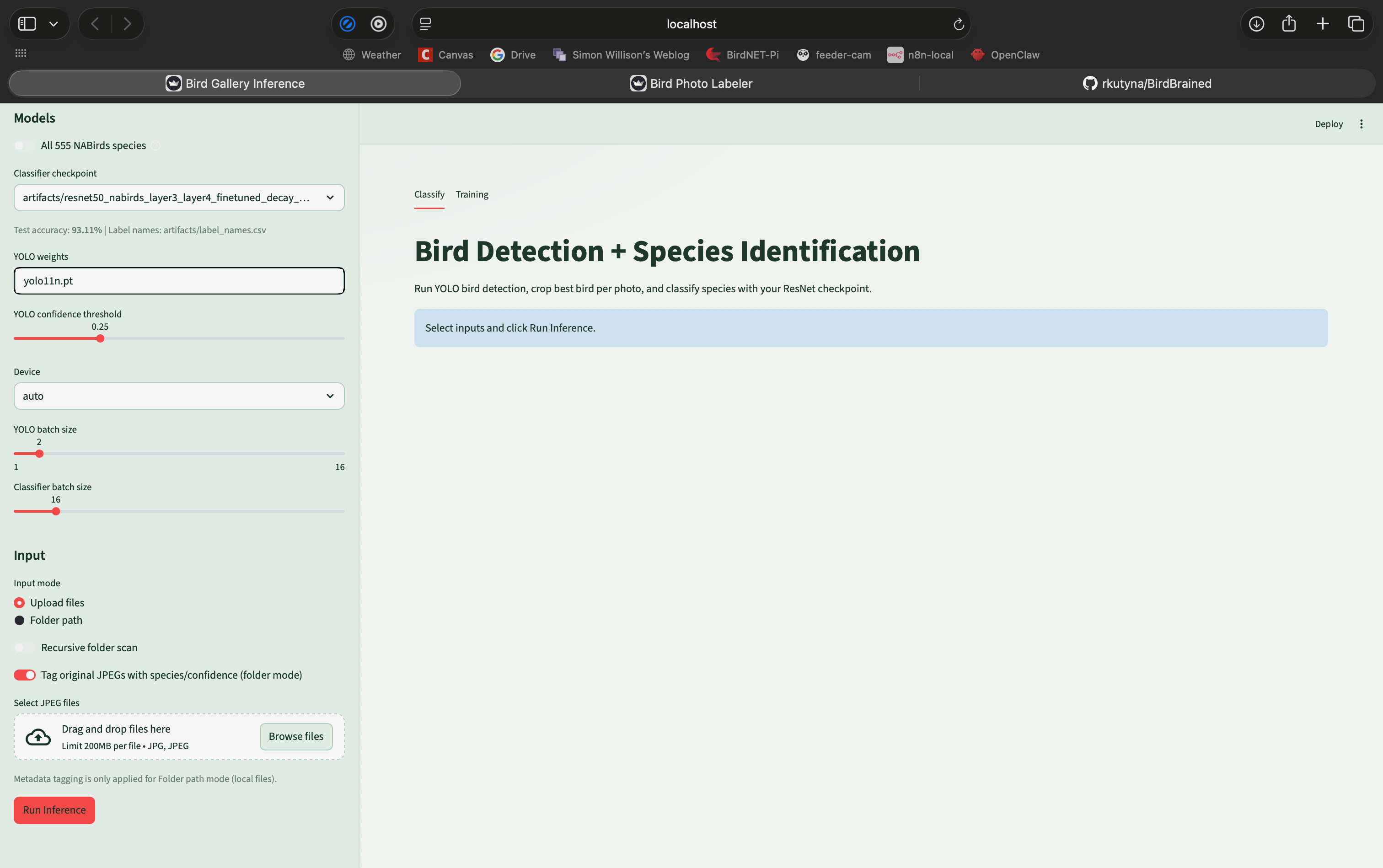
Intro BirdBrained is the project that I have come up with for my capstone project for my Master’s degree. This is a project that is motivated by my need for photo library organization. Since I have gotten into bird photography, I have taken well over 30,000 photos (just since August of ‘25!). I was previously using iCloud photos which includes keyword search which automatic classification of photos, but since switching to local storage and Adobe Lightroom, I have been missing this feature. Pipeline: My knowledge of machine learning and AI gave me the idea to train my own bird species identification model that I can run locally to serve this function. This project is still in progress and I still want to experiment with several classifier models for a final write up with my final learnings. That being said, this project has been a huge success so far. The project is built on a pipeline that begins with YOLOv11 from Ultralytics that performs subject detection in each image. The subject detection model also creates bounding boxes for the subjects labeled “Bird”. The original image is cropped to this box and this cropped image of the bird is passed to the species identification model. The species identification model, based on ResNet-50, classifies the species. The cropped portion containing the bird is then passed to a sharpness scoring method that is based on using a Sobel Operator to calculate the Tenengrad energy of pixels which measures changes in brightness to do edge detection. Instead of measuring this score across the whole cropped section, it works in patches that are 10% of the image and move across the image. The top 5 patches according to Tenengrad energy are then averaged to produce a final sharpness score which is normalized to the sharpness scores of all photos from an inference run. Finally, the images are tagged with the predicted species and a confidence and sharpness score (low, medium, high). These are searchable keywords in Adobe Lightroom and enable easy library management. Training: When it comes to the choice of models for this project, I wanted something that was lightweight enough to train on my laptop (Macbook Pro with an Apple M3 Pro and 18 Gb of memory). With this constraint in mind, I chose a ResNet-50 that was pretrained on ImageNet. This model is relatively lightweight and has the potential to achieve high quality results. ResNet-50 is a 50 layer deep convolutional neural network developed in 2015 by Microsoft. A convolutional neural network is a neural net with a small filter that moves across the input to produce a feature map across the image to be passed through the rest of the network. A revolution that ResNet ushered in is the concept of residual connections that help to alleviate the vanishing gradient problem - changes from backpropagation get smaller and smaller the more layers it goes back - by ensuring that the gradient continues back when it would otherwise be reduced to near zero prior to reaching the early layers. This is a concept that has continued in machine learning and has been adopted by the transformer models that have revolutionized the field. The dataset that I am using for this project is a dataset of 48,000 labeled bird photos that consists of 404 species that are found in North America. This dataset was released in 2014 and is coordinated by the Cornell Lab of Ornithology for computer vision use: https://dl.allaboutbirds.org/nabirds. For my initial testing, I used a subset of 98 species of birds that are found in New England and would cover the majority of birds that I have photographed while enabling much faster training times. The first step of Fine-Tuning on this dataset is to unfreeze only the Head (final layer) which allows the pattern recognition that has been trained on ImageNet to be adapted to the bird species dataset. Next, Layer4 is also unfrozen at a lower learning rate to ensure that the beneficial high level feature recognition is not overwritten. Layer4 is able to learn the high level features necessary for the task of bird species identification. Lastly, Layer3 is unfrozen with a lower learning rate to allow for mid-level features to be adapted to the species identification task. Initially, I was able to achieve an accuracy of around 80% on the dataset using the supplied train/test split, which was 50/50. I was able to improve the accuracy to around 85% by simply changing the train/test split to 80/20 while ensuring that this ratio was maintained across the species within the split (80/20 per species). At this point, the primary issue that I was running into was overfitting. While 48,000 images may sound like a large number, this is actually a very small dataset when it comes to modern-day machine learning models, especially with more than 400 classes. This meant that the model would optimize too much for the training split, achieving an accuracy of over 99% while struggling to approach 90% on the test split. To combat this, I first experimented by modifying the learning rate and batch size, however these didn’t have much impact on this issue. I also tested a range of weight decay values which adds a loss penalty based on the magnitude of the model weights, but this didn’t appear to help. The most effective modification in initial training was label smoothing, which lowers the value of the correct class value by some value to again help prevent overfitting. A value of 0.05 allowed the model to consistently hit an accuracy of ~90%. After the revelation of a label smoothing, I went back to experimenting with the learning rate by lowering it, again to prevent overfitting. This was reasonably effective, bringing the accuracy to 91.6%. The most recent improvement has been through the implementation of a suite of dataset augmentation features to help combat the small size of the dataset. The first of these is RandomResizedCrop, which randomly crops a sub region of the image area and resizes it back to the image size of 240 by 240 and helps to ensure the model can recognize birds at different scales and position while introducing greater variation into the database. The second feature is RandomHorizonFlip which horizontally mirrors the image 50% of the time, again increasing the effective size of the training dataset. Third is ColorJitter, which modifies brightness, contrast, saturation, and hue by small amounts to vary the images to match potential variation in real photos and different shooting conditions. Fourth is RandomErasing, which creates a random black rectangle that covers 20% of the image for 30% of images to help generalize further and better handle situations where a part of the bird is obscured. The last modification is an addition of Dropout which randomly zeros some portion (in this case, 40%) of activates between Layer4 and the final layer. This forces the model to learn to be more robust by identifying species based on a variety of features rather than a smaller subset. These further modifications have allowed me to reach an accuracy of 93.11% on the base dataset, 93.2% Top-1 and 100% Top-5 accuracy on my personal test dataset. Next Steps Next, I intend to implement MixUp or CutMix to further help reduce memorization of the training dataset. I also would like to implement learning rate scheduling and further experiment with learning rates and the number of epochs of each training stage now that the issue of overfitting has become less of a roadblock. I would also like to create a larger personal labeled test dataset to be able to get a more accurate picture of the performance of this model. Up until this point, this has been done on the subset of 98 species, so I would like to attempt to train the model at the full 555 species to see how the accuracy compares. Lastly, I would like to do similar experimentation on other models, including at least one vision transformer, to compare performance. I do not have much budget for compute, but I would like to rent compute time on a remote server to make the final model as accurate as possible. I would also like to attempt to fine-tune the YOLO model for the purpose of being more accurate at bird identification, however it seems to be quite accurate and this is not the primary bottleneck for the project. It would also be beneficial to experiment more with the sharpness model and attempt to create a ML based model to score sharpness or specifically score sharpness on a bird’s eye, but again, this will come after further experimentation with the species identification model. To further explore the implementation of this project or to attempt to run it, check it out on my GitHub: https://github.com/rkutyna/BirdBrained
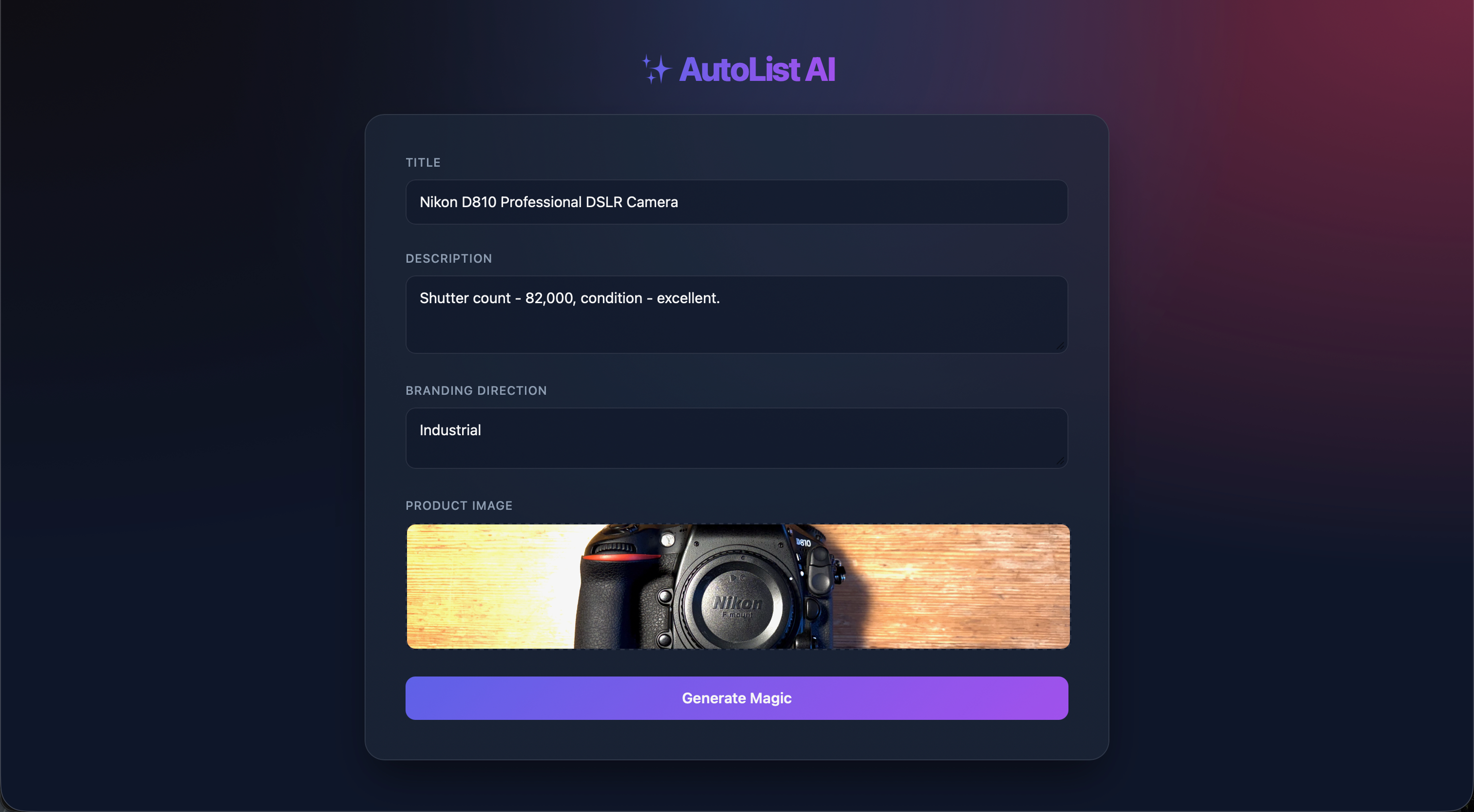
Autolist AI - Agentic Multimodal Product Listing Generator
Autolist AI is an agentic tool for generating everything needed for an online product listing from a single image. This project was built for a class I took last semester called Generative AI Model Development. The project is built using n8n to create an agentic workflow and is hosted on a mini pc running linux that I use for headless hosting. The project begins with a front end with a form to enter a title, description, branding direction, and photo. Upon submission, this triggers a webhook and begins the workflow. The first step is to pass the image to Google’s Nano Banana (Gemini 2.5 Flash) which removes the background of the image, leaving only the product. This image of the product is then passed to GPT 5.2, which does a web search to find information on the product to ensure that the product listing is grounded in existing information on the internet rather than hallucination. Fortunately, this does not prevent listing of products that do not exist on the internet elsewhere and the model will do its best to provide what information it can. Based on the results of the web search, image, and the stated branding direction, the next node uses GPT 5.2 to create a comprehensive branding direction and style that ensures the images and video generated are consistent. With this background done, the next steps begin. These steps are the image and video choreographers. GPT 5.2 is used for both and takes in all previous info and creates three prompts, each passed via structured output, to Nano Banana which generates an image based on the original product photo, background info, and photo prompt. The video creation works much the same way, a video prompt is created and passed to Sora 2 which generates the video. In addition to this step, GPT 5 Mini is used to create a product description based on the previous information. Finally, the images, video, and description are sent via the response to the webhook node to the front end where the description can be copied and the images and videos can be downloaded. I would love to host this publicly to let anyone try it, however it gets quite expensive due to the video generation that costs $0.10/second. If I were to implement this project in a production environment rather than for a class, I would make a number of changes. The primary flaw with this product is its fragility. If an API returns an error which happens often, the workflow will simply stop and need to be restarted. In order to fix this issue, I would instead break each piece into their own workflows that will auto retry if an API error is received. Each of these would then save to disk to ensure that the results remain. This, combined with a move to asynchronous execution that would allow the user to queue jobs and be notified when they complete, would allow each job to become much more robust and only execute each step once. In addition, many of these steps, such as the writing of the description, can be done with local models that would reduce API cost and likelihood of errors. I would also ensure that the use of this product is secured through a log in and only available within company networks. This, combined with rate limiting of API calls would reduce the risk of a surprise API usage bill. In this same vein, I would add a dashboard to be able to centrally visualize usage and handle errors. One last change that I would make is the ability to regenerate specific parts of the output without running the whole workflow again, or even giving an AI Agent the ability to look over the output for quality and regenerate pieces if necessary. This would ensure quality and would allow the user to replace one photo or the description without running the whole system again and costing API usage.
Blog Posts
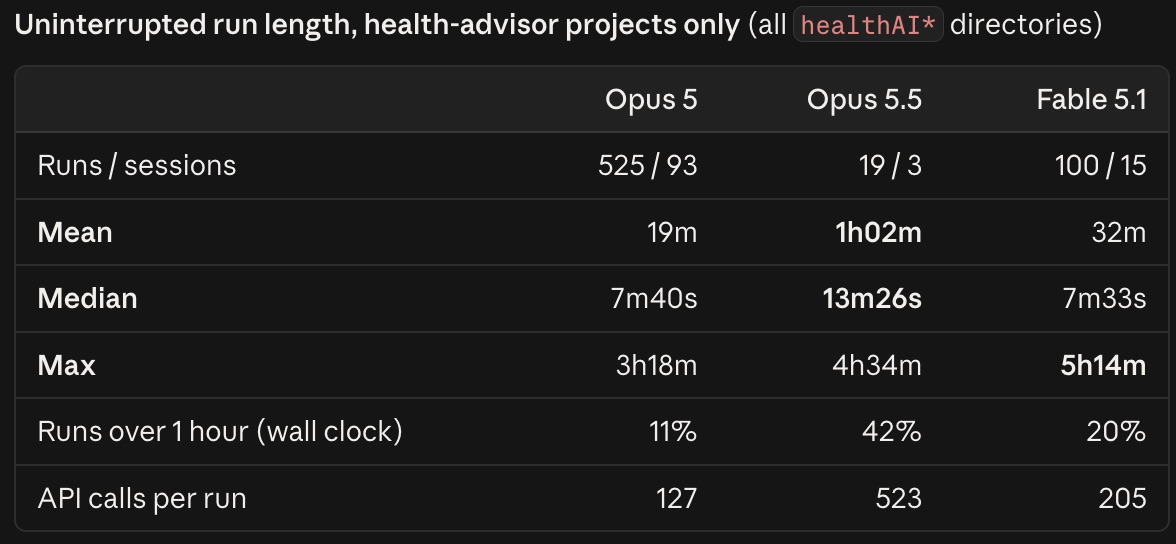
Opus 5 vs. Opus 5.5 Task Time Horizon Improvement
By now, I’m sure nearly everyone in the AI space has seen that Claude Opus 5.5 has been released. As someone who has used Opus 5 extensively over the last two months, particularly in the last month, I have noticed an impressive and undersold improvement of 5.5 over 5. As I’ve posted about, I have done extensive agentic development work on my Fitness Analyst AI project, using GitHub issues to track tasks and allow Claude to autonomously file, solve, and test issues on this project. This has worked very well, but I noticed that Opus 5 had a tendency to do a few tasks then stop. This was frustrating when I would start it running overnight and tell it to complete as many tasks as possible and continue working until 8 am and it would stop running at 1:30 am. I know that I could have set up a heartbeat system to prompt it to continue, but I didn’t. I have previously had Claude set a bash script running in the background to sleep for some amount of time so that it would wake Claude up when it exited and it could continue - mostly when I was about to hit my 5 hour usage limit - but even with this method, it wouldn’t run overnight or for an extended period of time. The only solution that I found to work was to use Fable 5 or 5.1 to act as an orchestrator and dispatch sequential Opus subagents (each doing subagent development with GPT 5.6 Luna themselves). In the last day or so using Opus 5.5, the model felt like it was much more inclined to just keep working. It is a small sample size, but I noticed this in particular when I started a task running in the afternoon, interacted a couple times - mostly running commands the classifier blocked - but left it alone for the most part. This session ended up running until ~4 am when I hadn’t even prompted it to run all night. This prompted me to have Claude compile my usage data and API message log to determine the median, mean, and maximum length that the model worked without my interruption. This resulted in the attached table where, despite the small sample size, Opus 5.5 has already surpassed the longest uninterrupted active time that Opus 5 achieved. Opus 5.5 also nearly doubles the median uninterrupted time. Unfortunately, there is not yet official data on the time horizon these models can work: https://metr.org/time-horizons/ - METR data has not been updated since the Mythos-Preview and Opus 4.6. I also felt like it did this while not growing its context anywhere near as fast as Opus 5. These two factors, combined could simply mean that Opus 5.5 is just slower - its context will fill slower and it will run for longer, but it will get less done. So, again, I had Claude check this and it found that the rate of GitHub issues closed per hour of work is identical, with Opus 5.5 completing ~3x more per prompt simply because it is inclined to run longer. Overall, Opus 5.5 feels like a significant step above Opus 5. It is an incredible time to be able to experience such a fast improvement in this technology. I have not gotten to test the latest OpenAI models, but I look forward to getting to test GPT 6 Astra and I will likely use GPT 6 Luna as a subagent for Claude Opus 5.5 due to its excellent performance for the price. **Update:** Since I originally wrote this post last night, the longest time that Opus 5.5 had run was 4 hours and 34 minutes. Overnight, I had it do more work and it smashed that time, reaching 6 hours and 27 minutes. It blows my mind that this model is capable of working, staying on task, and remaining productive for nearly an entire work day.
09/25/2026, 1:41 PM
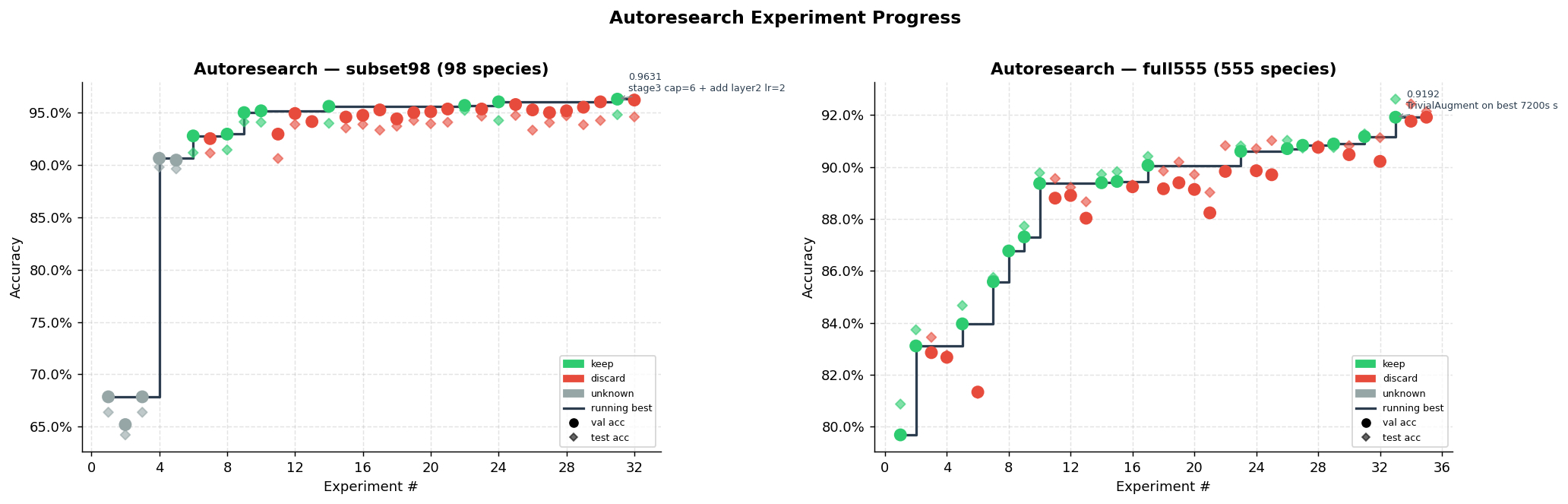
Blog #3: Automating Bird Species Identification Model Experimentation
This update to my BirdBrained project is one that I am particularly excited about. It is an automated agentic experimentation loop that is inspired by Andrej Karpathy’s autoresearch project (https://github.com/karpathy/autoresearch). Karpathy’s autoresearch project is based on the idea that an agent is capable of running experiments to improve an AI model if given the capability to do so. Within his project, a program.md file is used to instruct the agent on how the setup works, prepare.py is the file that prepares the environment and dataset, and train.py is the file that facilitates the experimentation and gives the agent access to all parameters and potential modifications. Train.py is the file that the agent actually modifies to change the experiment on each iteration. In Karpathy’s implementation, this is used to train a small LLM on an Nvidia H100. Setup: I decided that this concept would be worth experimenting with on my own model training project: the bird species identification model that is part of my BirdBrained project (https://rogerkutyna.com/projects/8). In order to do this, I used Claude Code to create a framework similar to Karpathy’s project. It consists of four files: program.md, autorun.py, prepare.py, and train.py. Prepare.py handles preparing the NABirds dataset as well as train/test splits. Autorun.py contains the iterative framework that facilitates each experiment. It starts by saving the training configuration in train.py, building the prompt for the agent from program.md, launching a codex exec instance, and keeping or restoring the train.py file. The train.py file contains the actual logic for fine-tuning the model and all hyperparameters and augmentations for the agent to tune before a training run. The modification of these parameters is done by the agent, which in this case is GPT-5.4 that is called through a codex exec instance. This agent is given the contents of program.md as a prompt, the training history, and is instructed to test one hypothesis to improve the accuracy of the species identification model. It then runs the train.py file and monitors the training performance. When the run is completed, if the accuracy increases, the updates the agent made to the train.py file are incorporated into the file as the new default, the agent writes short notes on the training performance, and the results are saved in a csv file with previous runs. Each run is limited by a time limit to ensure that they are comparable and take a finite amount of time. The loop runs for a number of iterations set with a CLI flag. Results: I ran this training loop both for the 98 species subset that I used for initial training and the full 555 species dataset for a total of 71 runs over the course of several days. On the 98 species subset, the agent-run training was able to achieve a top-1 accuracy of 96.31% on the test split, 94.6% top-1 accuracy on my personal test set, and a 100% top-5 accuracy on my personal test set. This is an improvement of 3.20% over the result I was able to achieve training the model myself. On the full 555 species dataset, the agent-run training was able to achieve a top-1 accuracy of 91.91% on the test split, 88.3% top-1 accuracy on my personal test set, and 100% top-5 accuracy on my personal test set. This is an improvement of 8.26% from what I was able to do in the small number of training runs that I did with the full dataset. What is most interesting to analyze are the changes that the agent made. On the 98 subset runs, it was able to reach ~93% accuracy by just modifying the learning rate and adjusting the number of epochs for each stage of training. Implementing test time augmentation (a simple horizontal flip of the image) brought this accuracy to 95%. The next improvement was through the implementation of GeM (Generalized Mean) Pooling. The base ResNet-50 model contains a global average pooling layer after the last convolutional layer that takes the average of a 7x7 grid for each of the 2048 channels. Each channel represents a feature, so the average of this grid is basically how present is the feature learned by this channel. GeM Pooling changes this from the average to GeM(x) = ( mean of x^p )^(1/p) where p is a learned value. A higher p value will mean that just the peak activation will survive, while a p of 1 weighs each location in the 7x7 grid equally. This allows the model to learn whether it should pay attention to the most highly activated regions of a channel (feature) or if they should be considered the same. This helps with bird species identification as the difference between species is often in specific areas, so weighting the highest activation can help to distinguish between otherwise similar images. This feature further brought the accuracy up another 0.2% to 95.19%. Training was initially capped at 20 minutes, then 30 minutes, and the final runs were capped at 40 minutes. The increase of time along with the addition of the ability to train all layers led to the final accuracy of 96.31%. On the full 555 training runs, the time was set at 60 minutes and was later increased to 120 minutes to handle the much larger dataset. This training also began with the best training configuration from the 98 species subset, so it had less modifications to make that weren’t already implemented. In the first several runs, it was able to achieve an accuracy in the mid 80% range, which was on par with my previous runs. The primary gains came from minimizing the time spent training the head (final layer) and layer 4. Going straight to layer 4 yielded the best results thus far, bringing the accuracy to 88.9%. The agent continued to tune the stages and learning rate and was able to reach an accuracy of 90.1% before extending the time limit to 120 minutes. This increase, along with the addition of trivial augment (randomly selects one operation from a broad pool including color adjustments, sharpness, rotation, and translation, applied at a random magnitude) brought the accuracy up to its final value of 91.91%. This is a great result, but I have yet to experiment with the unfrozen layer 1 and 2 training using the full 555 species dataset, so I will do a couple runs with a 240 minute time limit overnight and update this when I have those results. Conclusion: This concept of autoresearch has been tremendously successful. It was relatively easy to implement and having GPT 5.4 run experiments has produced good results. I think that I would have been able to reach the same accuracy given the same number of training runs, but the ability to set it and forget about it while it experiments is very convenient. It also allows it to pivot in a way that queueing a large number of runs and letting them run before checking results would not. I am certainly interested in exploring this concept in the future with different types of models and higher end hardware, but for now I am very pleased. Next Steps: Given that this has produced excellent results thus far, I am excited to keep experimenting with it. The primary thing that I would like to do next is to explore using different models, such as a vision transformer, for this same task using the autoresearch concept. I will also plan to purchase an Nvidia RTX 3060 12gb that will be a large step up over my Apple M3 Pro for training runs like this. Either that, or I will rent compute time on a server for the same purpose.
03/17/2026, 8:03 PM
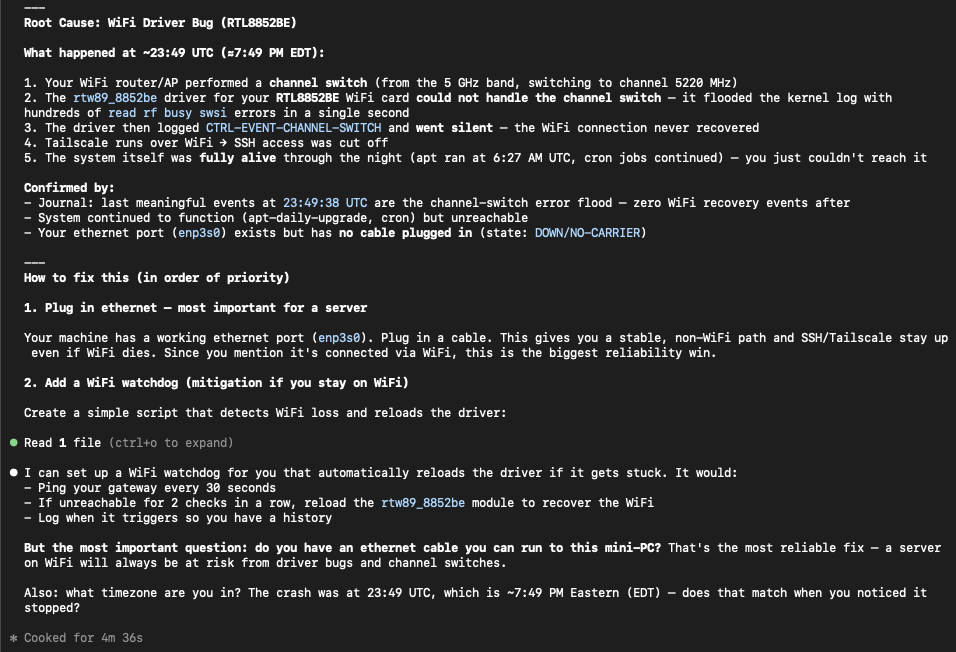
Blog #2: Claude Code Diagnosing System Failures
This morning, I went to start applying to jobs and realized that my OpenClaw agent hadn't sent my daily briefing. I checked this website too and it was down. Definitely a nerve-racking moment - I'm applying for jobs and my portfolio website is down! I tried to access the machine that these services are running on via SSH and was unable to reach it. This machine has been a little finicky before, so I wasn't totally surprised, just annoyed. Fortunately, I was able to get it back up and running by manually restarting the computer. However, this didn't solve the root cause obviously. I've seen a lot of hype recently about Claude Code and Codex and had good experiences with both building apps and small projects recently, so I decided to let Claude try to fix it with this prompt: "This is my mini-pc that I have running a web server, openclaw, and n8n. It was working yesterday, but last night around 7-8 pm it stopped responding. I just noticed this morning and had my partner restart it via the power button, and now it's back up (I access it via ssh and tailscale, so I was locked out until it restarted). Given that this hosts my portfolio and i'm applying to jobs, I need it to be up. Can you investigate why this happened - check whatever logs necessary, etc. It's running ubuntu server 25.10. Please ask me any necessary questions to help or if you need me to help access something on the computer" Claude explored a variety of logs and eventually was able to find the root cause - the WiFi driver disconnecting and failing to reconnect. Beyond just identifying the problem, Claude created a WiFI watchdog program to check that the gateway is up every 30 seconds and restart the driver if it is down for more than a minute. This should resolve the problem going forward. I have also set up an account with uptimerobot.com to monitor my website and notify me if it goes down in the future. You can check the public status website here: https://stats.uptimerobot.com/S49FWeGbP1 This experience is just one of many recently that have made me very optimistic for the progress of LLM based Agents. I know that there are many complicating factors for doing this same work in a production setting - large code base, security concerns - but I’m still impressed.
03/12/2026, 1:35 PM
Blog #1: OpenClaw
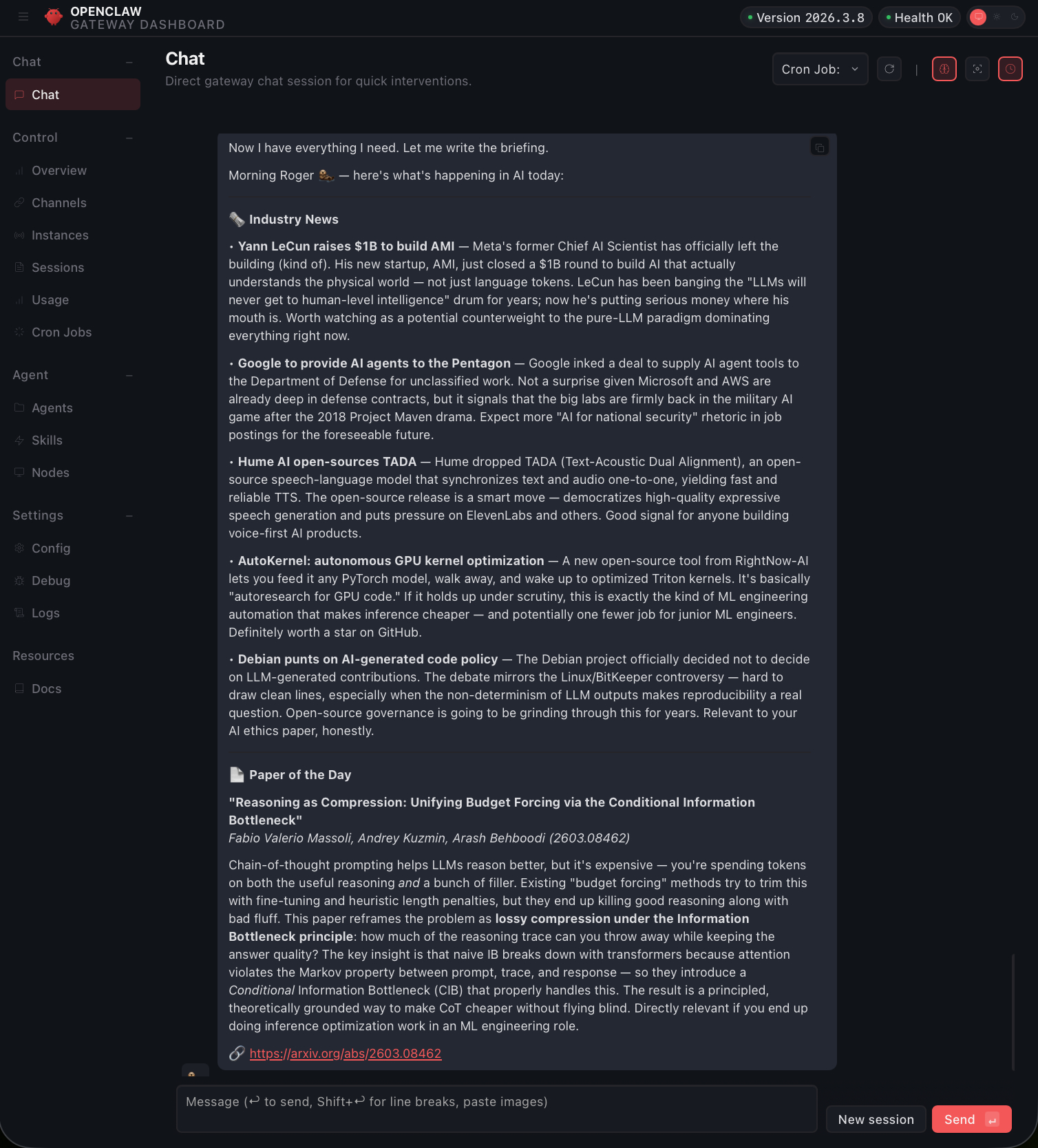
After seeing quite a lot of coverage on OpenClaw - much of it about the security concerns and the hilarity of Moltbook, I finally decided to try it. In order to mitigate some of the security concerns, I opted to install OpenClaw using Docker on my mini-pc that I use for hosting a website along with a couple other small services. After a little bit of trial and error, I was able to get OpenClaw running with interaction via Telegram and linked to Anthropic to use Claude Sonnet 4.6 via the API. So far I have simply asked it to give me a daily briefing on daily AI news and one AI/ML research paper at 8am daily. This is certainly useful, but what has amazed me most is its ability to fix itself. I noticed that it was using a tremendous amount of tokens on my Anthropic API key (Expensive!). When I checked the console, I realized that it had failed at creating the briefing - an error with web search I believe. But it had simply tried a different method and successfully completed the briefing. Another cause of the excessive token usage is because it had created a briefing using the heartbeat and using a cron job, so it was creating two briefings each day and only one was reaching me. All I had to do to fix it was tell it to investigate the issue and fix it and it just did it! I've become used to tools like Codex or Claude Code being good at fixing issues in other programs, but this took it to another level and I look forward to a day when these tools are reliable and secure enough to fully manage my computer. I will certainly keep experimenting with this tool and I'm happy to hear suggestions on how to use these tools, just shoot me an email! [email protected]
03/12/2026, 1:34 PM
Contact
The fastest way to reach me is email. I'm always happy to talk about AI, ML, engineering work, or birding/photography.